Every request is one strip, in a fixed order
The cache can only reuse the start of the prompt. Nothing from the middle.
Your code sends the tool definitions, the system prompt, and the whole message history on every request. The API lays them out as one strip, always in this order: tools, then the system prompt, then the messages.
Why only the start?
The cache does not store your text. It stores the model's processed form of the text; the docs call it the KV cache. A language model reads left to right, and the processed form of each block depends on every block before it. So if one early block changes, every block after it has a different processed form, even when its own text is the same. The stored work for them is useless.
- Each curve is a dependency. Block 3 depends on blocks 1 and 2. Block 5 depends on all four before it.
- Block 1 changes. Its own processed form changes.
- Block 2 depends on block 1, so its processed form changes too, even though its text did not.
- Block 3 depends on block 1, so its processed form changes too, even though its text did not.
- Block 4 depends on block 1, so its processed form changes too, even though its text did not.
- Block 5 depends on block 1, so its processed form changes too, even though its text did not.
- One early change made every later block useless to reuse. This is why the cache works only on a prefix, and why the order of the strip matters.
This figure describes how transformer language models work in general. Anthropic's docs confirm that what is cached is the KV cache representation of the prefix.
A cache entry is filed under a fingerprint
Same bytes, same fingerprint, cache hit. One changed byte, different fingerprint, cache miss.
At a breakpoint, the API computes a cryptographic hash of every byte from the start of the strip up to and including that block. Think of the hash as a fingerprint. The processed prefix is stored under that fingerprint.
On the next request, the lookup starts at the last breakpoint and walks backward, one block at a time. At each block where an earlier request wrote an entry, it compares fingerprints. It never compares text. Because it walks backward, the first match it finds is the longest prefix that can be reused. Section 3 shows the walk in detail.
| Position | Entry from request 1 | Request 2 fingerprint | Result |
|---|---|---|---|
| block 7 | none | …2653542f | waitingno entry here |
| block 6 | 3e70452e | …3e70452e | waitingmatch: stop |
| block 3 | 5f1df0c2 | …… | waitingnot checked |
| block 2 | 8a79bc3e | …… | waitingnot checked |
- Request 2 is request 1 with one new message at the end. Its last breakpoint moves to the new block, block 7.
- The lookup starts at request 2's last breakpoint, block 7, and walks backward, exactly as in section 3.
- Block 7: no entry was ever written here. Keep walking.
- Block 6: request 1 wrote an entry here, and the fingerprint is the same. Found. The walk stops.
- Walking backward, the first match is also the longest cached prefix: blocks 1 to 6.
- Blocks 1 to 6 are read from the cache. Only the new message is processed at full price, and a new entry is written at the new breakpoint, block 7.
| Position | Entry from request 1 | Request 2 fingerprint | Result |
|---|---|---|---|
| block 6 | 3e70452e | …38636bf7 | waitingno match |
| block 3 | 5f1df0c2 | …2e9943c7 | waitingno match |
| block 2 | 8a79bc3e | …8a79bc3e | waitingmatch: stop |
- Request 2 adds two words to the system prompt, in block 3. Everything else is the same.
- The lookup starts at request 2's last breakpoint, block 6, and walks backward, exactly as in section 3.
- Block 6: request 1 wrote an entry here, but request 2's fingerprint is different. Keep walking.
- Block 5: no entry was ever written here. Keep walking.
- Block 4: no entry was ever written here. Keep walking.
- Block 3: request 1 wrote an entry here, but request 2's fingerprint is different. Keep walking.
- Block 2: request 1 wrote an entry here, and the fingerprint is the same. Found. The walk stops.
- Walking backward, the first match is also the longest cached prefix: blocks 1 to 2.
- Blocks 1 and 2, the tools, are read from the cache. The system prompt and every message after it are processed again, and new entries are written at blocks 3 and 6.
| Position | Entry from request 1 | Request 2 fingerprint | Result |
|---|---|---|---|
| block 6 | 3e70452e | …4172dc85 | waitingno match |
| block 3 | 5f1df0c2 | …6a79e385 | waitingno match |
| block 2 | 8a79bc3e | …86308cf1 | waitingno match |
- Request 2 adds one parameter to the first tool, in block 1. Everything else is the same.
- The lookup starts at request 2's last breakpoint, block 6, and walks backward, exactly as in section 3.
- Block 6: request 1 wrote an entry here, but request 2's fingerprint is different. Keep walking.
- Block 5: no entry was ever written here. Keep walking.
- Block 4: no entry was ever written here. Keep walking.
- Block 3: request 1 wrote an entry here, but request 2's fingerprint is different. Keep walking.
- Block 2: request 1 wrote an entry here, but request 2's fingerprint is different. Keep walking.
- Block 1: no entry was ever written here. Keep walking.
- The walk reached block 1 without a match. Nothing can be read from the cache.
- Nothing is read from the cache. The whole strip is processed again, and new entries are written at blocks 2, 3 and 6. Adding or removing a tool does the same.
Breakpoints: where entries are written, and how far back a read looks
An entry is written only at a breakpoint. A read walks back at most 20 blocks to find one.
- A breakpoint writes exactly one entry, at that block. Nothing is written for the blocks before it.
- To read, the API starts at the breakpoint and steps backward one block at a time. At each block it asks: did an earlier request write an entry here? It checks at most 20 positions, counting the breakpoint itself.
- A request can carry up to 4 breakpoints. Breakpoints are free; you pay only for what is written and read.
- Automatic caching is a single top-level
cache_controlfield. It places the breakpoint on the last block and moves it forward as the conversation grows. It takes one of the 4 slots.
- Turn 1: the conversation has 10 blocks, with a breakpoint on block 10. No request has written anything yet.
- The read starts at the breakpoint on block 10 and steps backward, looking for an entry.
- The walk reaches block 1. No request has written an entry, so there is nothing to find.
- Result: all 10 blocks are processed, and an entry is written at block 10 for the next turn to find.
- Turn 2: 5 more blocks, so 15 in total. The breakpoint is on block 15. Turn 1 left an entry at block 10.
- The read starts at the breakpoint on block 15 and steps backward, looking for an entry.
- Check 6 lands on block 10, where an earlier request wrote an entry. Found.
- Result: blocks 1 to 10 are read from the cache. Blocks 11 to 15 are processed, and an entry is written at block 15.
- Turn 3: one message adds 20 blocks at once, so 35 in total. Entries exist at blocks 10 and 15.
- The read starts at the breakpoint on block 35 and steps backward, looking for an entry.
- All 20 checks are used up at block 16. The walk stops there.
- Result: the entry at block 15 was one position out of reach. All 35 blocks are processed, including the 15 that were cached.
- The fix: turn 3 again, now with a second breakpoint at block 15.
- The read starts at the breakpoint on block 35 and steps backward, looking for an entry.
- All 20 checks are used up, and none found an entry. The second breakpoint starts a fresh walk at block 15.
- Check 1 lands on block 15, where an earlier request wrote an entry. Found.
- Result: blocks 1 to 15 are read from the cache, thanks to the second breakpoint. Blocks 16 to 35 are processed.
- Request 1 was sent with its breakpoint on block 6, so its only entry is at block 6. Block 6 starts with a timestamp: 10:02:13.
- Request 2 is identical except for the timestamp in block 6: 10:03:40 instead of 10:02:13.
- Block 6, the breakpoint: the fingerprint includes the new timestamp, so it differs from the entry request 1 wrote.
- Blocks 5 to 1: no request ever wrote an entry there. The walk reaches block 1 without a match.
- Result: a miss, on every request, forever. Each one pays full price plus the write premium, and writes an entry nobody will read.
- Now move the breakpoint to block 5, the last block that stays the same. Request 1 writes its only entry at block 5.
- Request 2 again, with the new timestamp in block 6.
- Block 5, the breakpoint: the fingerprint is the same as the entry request 1 wrote. Found.
- Result: blocks 1 to 5 are read from the cache, and only block 6 is processed. The rule: put the breakpoint at the end of the part that stays the same.
Five minutes, reset by every hit
An entry lives 5 minutes. Every hit resets the clock to a full 5 minutes, at no extra cost.
- The hit itself is billed at the cache-read price. The reset comes with the read; nothing is added for it.
- The clock counts from the start of a request, not the end of its response. A response that streams for 4 minutes leaves about 1 minute for the next request.
- For longer gaps, set
"ttl": "1h". A 1-hour entry costs 2× the base input price to write, instead of 1.25×. - An entry nobody reads expires, and is deleted soon after.
Paid for the prefix so far: 0×Without caching: 0×
Prices are multiples of the base input price for the prefix. A write costs 1.25× (5 minutes) or 2× (1 hour). A read costs 0.1× on most models.
An entry belongs to a workspace, not to a chat or an API key
Anyone in the same workspace who sends the same prefix gets the hit. Nobody outside it ever does.
The API does not track conversations or users. Any request from the same workspace, with any API key, that sends the same prefix bytes reads the same entry. Other workspaces never see it. Other organizations never see it, even with identical prompts.
That holds on the Claude API, Claude Platform on AWS, and Microsoft Foundry. On Amazon Bedrock and Google Cloud, the boundary is the organization instead of the workspace.
5b027df55b027df55b027df5- Ana sends the prompt first. Workspace 1 has no entry for it yet, so her request is a miss and writes one.
- Ben sends the same bytes from another API key in the same workspace. He reads the entry Ana wrote.
- Chen is in the same organization, but in workspace 2. Workspaces do not share entries, so Chen misses and writes a separate one.
- Dee is in another organization. Organizations never share entries, even for identical prompts.
- Same prompt, four requests: one hit, and three separate entries in three separate places.
One more rule: a new entry can be read only once the first response has started. Requests fired in parallel at the same moment all miss.
Adding a tool partway through a conversation
Editing the tool list is the most expensive change there is: nothing is read from the cache on that request.
Tools sit at the very front of the strip, and the docs say any change to the tool definitions invalidates the whole cache. The old entries are not deleted, though. A request that still sends the old tool list keeps hitting them until they expire.
Some models have a beta that avoids the miss. You declare the tool from the first request with "defer_loading": true. When you want it, you append a system message with a tool_addition block. The tools array never changes, so the prefix still matches.
Edit the tools array
Works on every model, including Sonnet 5.
✕ Nothing is read from the cache. Every block is processed again.
Append a tool_addition
Beta. Not available on Sonnet 5.
✓ The prefix is unchanged. Only the 2 appended blocks are processed.
- Way 1. Request 1 had one tool. Request 2 puts get_forecast into the tools array.
- The tools are the first thing in the strip, so every fingerprint changes. The lookup finds no match anywhere.
- Way 2. Request 1 already declared get_forecast, marked deferred, so the model did not see it yet.
- Request 2 turns it on with a tool_addition system message appended at the end. The tools array is untouched.
- Walking backward from the end, the lookup finds request 1's entry right where the old strip ended. Only the 2 appended blocks are processed.
- Same result for the model, very different cost. On Sonnet 5 only way 1 exists, so declare every tool from the first request.
The beta header is mid-conversation-tool-changes-2026-07-01. It works on Claude Fable 5.1, Fable 5, Mythos 5.1, Mythos 5, Opus 5.5, Opus 5 and Opus 4.8, on the Claude API, Amazon Bedrock and Google Cloud. A newer beta, inline-tools-2026-09-15, lets you put the tool's full definition inside the tool_addition block instead of declaring it up front.
What it costs, with Sonnet 5 as the example
You pay a little extra once to write, then a tenth of the price for every read.
Caching changes the price of the prefix only. A 5-minute entry pays for itself after one read. A 1-hour entry pays for itself after two reads.
- Base input, with no caching: 1×, $2.00 per million input tokens on Sonnet 5.
- Writing a 5-minute entry, on the first request: 1.25×, $2.50.
- Writing a 1-hour entry: 2×, $4.00.
- Every cache hit is a read: 0.1×, $0.20. A tenth of the base price.
Prices are per million input tokens on Sonnet 5. The read is 0.1× on most models, 0.05× on Opus 5.5, and 0.025× on Fable 5.1 and Mythos 5.1.
Without caching
- Request 1: full price$0.020
- Request 2: full price$0.020
- Request 3: full price$0.020
- Request 4: full price$0.020
- Total for the prefix$0.080
With a 5-minute cache
- write Request 1$0.025
- read Request 2$0.002
- read Request 3$0.002
- read Request 4$0.002
- Total for the prefix$0.031
- Request 1. Without caching it costs full price, $0.020. With caching it writes the entry: $0.025.
- Request 2 reads the entry: $0.002 instead of $0.020.
- Request 3 reads it again: $0.002.
- Request 4 reads it again: $0.002.
- Total for the prefix: $0.080 without caching, $0.031 with it. The write paid for itself on the first read.
The prefix must be long enough to cache. On Sonnet 5 the minimum is 1,024 tokens. A shorter prefix is simply processed without caching, and no error is returned.
How to see it on every response
Every response tells you how many tokens were read, written, and processed normally.
The usage object on each response splits the input tokens into three numbers. They add up to the total input.
cache_read_input_tokens- Tokens before the breakpoint that were read from the cache. If this stays at 0 across repeated requests, something in your prefix changes every time.
cache_creation_input_tokens- Tokens before the breakpoint that were written to the cache on this request.
input_tokens- Only the tokens after the last breakpoint. They are not eligible for the cache. This is not the total.
- 10,000 tokens before the breakpoint were read from the cache: cache_read_input_tokens.
- 1,400 tokens before the breakpoint were written to the cache on this request: cache_creation_input_tokens.
- 200 tokens came after the last breakpoint and were processed normally: input_tokens. The three add up to the total input.
Total input = cache_read_input_tokens + cache_creation_input_tokens + input_tokens. The numbers in the bar are an illustration.
For developers: putting it in code
Everything above is what the cache does. Everything below is what you write to make it happen: where the breakpoints go, who places them, and how to check that they work.
Caching is opt-in. You switch it on in code.
Anthropic never caches a prompt unless the request contains cache_control. There are two ways to add it.
- Automatic caching. Add one
cache_controlfield at the top level of the request. The API puts the breakpoint on the last cacheable block. On every new request the last block is further along, so the breakpoint moves forward by itself. You never touch it again. - Explicit breakpoints. Put
cache_controlon specific blocks: a tool definition, a system block, or a message content block. The breakpoint stays exactly where you put it. - Both together. They combine. The automatic breakpoint takes one of the 4 slots, so you can have up to 3 explicit ones next to it.
Automatic: one top-level field
cache_control at the top level of the request.
Writes all 3 blocks. The breakpoint sits on the last block.The breakpoint moved to block 5. Blocks 1 to 3 are read, and the 2 new ones are written.The breakpoint moved to block 7. Blocks 1 to 5 are read, and the 2 new ones are written.
Explicit: on the last system block
cache_control on the system prompt only.
Writes tools and system. The message is normal input.The breakpoint is still on block 2. Tools and system are read. All 3 messages are normal input, every time.The breakpoint is still on block 2. Tools and system are read. All 5 messages are normal input, every time.
- Request 1: tools, the system prompt and the first user message. Nothing is stored yet.
- Request 2: the same blocks again, plus the answer and a new question.
- Request 3: the same blocks again, plus the answer and a new question.
- Automatic caching follows the conversation. An explicit breakpoint protects a fixed part. Most chat applications want both.
The code
# Automatic caching: one field, and the breakpoint follows the conversation.
import anthropic

client = anthropic.Anthropic()

response = client.messages.create(
    model="claude-sonnet-5",
    max_tokens=1024,
    cache_control={"type": "ephemeral"},  # top level = automatic
    system="You are a support agent for Acme.",
    messages=history,  # the whole conversation so far, unchanged, plus the new message
)
print(response.usage)
// Automatic caching: one field, and the breakpoint follows the conversation.
import Anthropic from "@anthropic-ai/sdk";

const client = new Anthropic();

const response = await client.messages.create({
  model: "claude-sonnet-5",
  max_tokens: 1024,
  cache_control: { type: "ephemeral" }, // top level = automatic
  system: "You are a support agent for Acme.",
  messages: history, // the whole conversation so far, unchanged, plus the new message
});
console.log(response.usage);
{
  "model": "claude-sonnet-5",
  "max_tokens": 1024,
  "cache_control": {"type": "ephemeral"},
  "system": "You are a support agent for Acme.",
  "messages": [ ...the conversation so far... ]
}
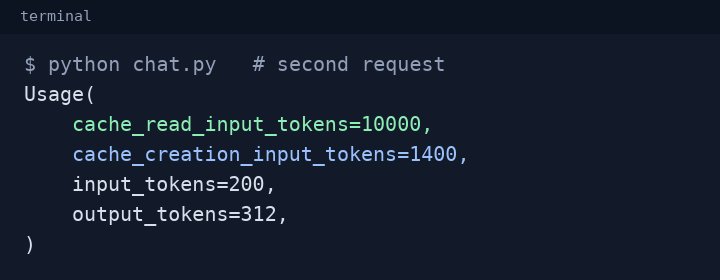
print(response.usage) shows on the second request. The numbers are illustrative.Rules for the automatic breakpoint
- If the last block is not eligible, the API silently walks backward to the nearest eligible block. If there is none, caching is skipped.
- If the last block already has an explicit
cache_controlwith the same TTL, the top-level field does nothing extra. - If the last block has an explicit
cache_controlwith a different TTL, the API returns a 400 error. - If you already have 4 explicit breakpoints, adding the top-level field returns a 400 error: there is no slot left.
- It sits on the last block, so it falls into the trap from section 3 when that block changes every request, for example a timestamp. Use an explicit breakpoint on the last stable block instead.
- It works on every platform except the legacy Amazon Bedrock integration (Opus 4.6 and earlier), which returns a 400 for a top-level
cache_control.
The one breakpoint the API adds for you
When a request already has at least one cache_control and Claude uses a server tool (web search, web fetch, or code execution), the API places a breakpoint on each server tool result before the next step of its loop. Later steps in the same request then read the growing prefix from the cache. These breakpoints always use the 5-minute TTL and show up under usage.cache_creation.ephemeral_5m_input_tokens. A request with no cache_control never gets them.
Where cache_control can go
On almost any block. The breakpoint covers everything from the very first block up to the block you mark.
// POST /v1/messages
{
  "model": "claude-sonnet-5",
  A"cache_control": {"type": "ephemeral"},
  "tools": [
    {"name": "search_orders", "input_schema": {...}},
    {"name": "refund_order",  "input_schema": {...},
     B"cache_control": {"type": "ephemeral"}}
  ],
  "system": [
    {"type": "text", "text": "You are a support agent."},
    {"type": "text", "text": "<manual>...</manual>",
     C"cache_control": {"type": "ephemeral"}}
  ],
  "messages": [
    {"role": "user", "content": [
      {"type": "document", "source": {...},
       D"cache_control": {"type": "ephemeral"}},
      {"type": "text", "text": "Summarize the contract."}
    ]},
    {"role": "assistant", "content": [
      {"type": "tool_use", "id": "toolu_1", ...}
    ]},
    {"role": "user", "content": [
      {"type": "tool_result", "tool_use_id": "toolu_1", ...,
       E"cache_control": {"type": "ephemeral"}}
    ]}
  ]
}
- ATop level. Automatic caching: the breakpoint lands on the last cacheable block. Counts as one of the 4.
- BOn the last tool. Caches every tool definition up to and including it. For an
mcp_toolset, or the computer and browser toolsets, put it on the toolset entry itself. - COn a system block. The system prompt must be an array of text blocks to carry a marker; a plain string has nowhere to put it.
- DOn a message content block. Text in user and assistant turns, and images and documents in user turns.
- EOn tool use and tool results.
tool_useandtool_resultblocks can carry a marker too.
This request shows every place a marker can go. A real request may carry at most 4 breakpoints, the automatic one included.
What cannot carry a marker
- Thinking blocks. You cannot mark them. They are still cached as part of an earlier assistant turn, and they count as input tokens when read.
- Sub-blocks such as citations. Mark the top-level document block that the citations point to.
- Empty text blocks.
Too short to cache
A prefix shorter than the model's minimum is processed without caching, and no error is returned. You only notice through usage. These minimums are the ones for the Claude API, Claude Platform on AWS, Google Cloud and Microsoft Foundry.
| Minimum prefix | Models |
|---|---|
| 512 tokens | Fable 5.1, Mythos 5.1, Opus 5.5, Opus 5, Fable 5, Mythos 5 |
| 1,024 tokens | Sonnet 5, Opus 4.8, Sonnet 4.6, Sonnet 4.5 |
| 2,048 tokens | Opus 4.7 |
| 4,096 tokens | Opus 4.6, Opus 4.5, Haiku 4.5 |
Playground: place the breakpoints yourself
Choose where the breakpoints go, send requests, and watch the lookup, the usage numbers and the bill.
A support bot on Sonnet 5: 4 tool definitions (1,500 tokens), a system prompt (600 tokens), and a product manual in the system prompt (20,000 tokens). Each turn adds an answer and a new question. One simulated minute passes between requests.
The request you are sending
response.usage
Input cost of each request (Sonnet 5)
| # | read | written | input | cost | no cache |
|---|
Recipes
Four patterns cover most applications.
Tools and a big system prompt, plus a growing chat
Two explicit breakpoints protect the parts that never change. The automatic one follows the conversation. If the conversation's entry expires, the lookup still falls back to the tools-and-system entry.
tools = [
    {"name": "search_orders", "description": "Find orders", "input_schema": SEARCH_SCHEMA},
    {"name": "refund_order", "description": "Refund an order", "input_schema": REFUND_SCHEMA,
     "cache_control": {"type": "ephemeral"}},  # breakpoint 1: every tool
]
system = [
    {"type": "text", "text": "You are a support agent for Acme."},
    {"type": "text", "text": manual_text,  # large and unchanging
     "cache_control": {"type": "ephemeral"}},  # breakpoint 2: tools + system
]

response = client.messages.create(
    model="claude-sonnet-5",
    max_tokens=1024,
    cache_control={"type": "ephemeral"},  # breakpoint 3, automatic: the conversation
    tools=tools,
    system=system,
    messages=history,
)
const tools = [
  { name: "search_orders", description: "Find orders", input_schema: SEARCH_SCHEMA },
  { name: "refund_order", description: "Refund an order", input_schema: REFUND_SCHEMA,
    cache_control: { type: "ephemeral" } }, // breakpoint 1: every tool
];
const system = [
  { type: "text", text: "You are a support agent for Acme." },
  { type: "text", text: manualText, // large and unchanging
    cache_control: { type: "ephemeral" } }, // breakpoint 2: tools + system
];

const response = await client.messages.create({
  model: "claude-sonnet-5",
  max_tokens: 1024,
  cache_control: { type: "ephemeral" }, // breakpoint 3, automatic: the conversation
  tools,
  system,
  messages: history,
});
Mixing 1-hour and 5-minute entries
Keep the slow-changing part for an hour, and the conversation for 5 minutes. The rule: every 1-hour breakpoint must come before every 5-minute one. The bill then splits at three points: A, the highest cache hit, is billed as a read. From A to B, the last 1-hour breakpoint, is billed as a 1-hour write. From B to C, the last breakpoint, is billed as a 5-minute write.
"system": [
  {"type": "text", "text": "<manual>...</manual>",
   "cache_control": {"type": "ephemeral", "ttl": "1h"}}   // must come first
],
"messages": [
  ...,
  {"role": "user", "content": [
    {"type": "text", "text": "Where is order 1182?",
     "cache_control": {"type": "ephemeral"}}                // 5 minutes, after
  ]}
]
Warming the cache before the first user arrives
Send a request with max_tokens: 0 and a placeholder user message. It writes the entry and produces no output, so the first real user skips the miss. Put the breakpoint on the last block the real requests share, not on the placeholder. It is billed as a normal write. The API rejects max_tokens: 0 together with stream: true, thinking.type: "enabled", structured outputs, a forced tool_choice, or inside a Message Batches request.
prewarm = client.messages.create(
    model="claude-sonnet-5",
    max_tokens=0,
    system=[{
        "type": "text",
        "text": LONG_SYSTEM_PROMPT,
        "cache_control": {"type": "ephemeral"},  # on the shared block
    }],
    messages=[{"role": "user", "content": "warmup"}],  # read, never answered
)
print(prewarm.usage.cache_creation_input_tokens)  # > 0 means the entry was written
Asking the API why a request missed
Cache diagnostics works on the Claude API only. It needs no beta header: include the diagnostics object on every request. On the first turn, pass previous_message_id: None. After that, pass the previous response's id. The response then names the first place the two requests diverged.
r1 = client.beta.messages.create(
    model="claude-sonnet-5", max_tokens=1024,
    cache_control={"type": "ephemeral"},
    system=SYSTEM,
    messages=[{"role": "user", "content": "Summarize section 1."}],
    diagnostics={"previous_message_id": None},
)
r2 = client.beta.messages.create(
    model="claude-sonnet-5", max_tokens=1024,
    cache_control={"type": "ephemeral"},
    system=SYSTEM,
    messages=[
        {"role": "user", "content": "Summarize section 1."},
        {"role": "assistant", "content": r1.content},
        {"role": "user", "content": "Now summarize section 2."},
    ],
    diagnostics={"previous_message_id": r1.id},
)
if r2.diagnostics is None:
    print("No divergence detected.")
elif r2.diagnostics.cache_miss_reason is None:
    print("Comparison still pending.")
else:
    print(r2.diagnostics.cache_miss_reason.type)  # e.g. "system_changed"
Why a cache misses when you expected a hit
It is almost always a byte that changed early in the prompt. Here is where to look.
| What you see | The usual cause | Diagnostics reports |
|---|---|---|
| Every request writes, none reads | A timestamp, request ID or per-user value inside the system prompt | system_changed |
| Misses from the very first block | Tools added, removed or reordered, or the tool JSON serialized with keys in a different order | tools_changed |
| Hits on tools and system, misses on history | The history was truncated, edited, or re-serialized differently when resent | messages_changed |
| A sudden full miss | A router, A/B test or fallback picked a different model. The cache is per model. | model_changed |
| The messages part misses, tools and system hit | A change to tool_choice, disable_parallel_tool_use, images added or removed, or thinking or effort settings. On some models a thinking or effort change misses the tools and system too. | unavailable for parameter changes |
| Nothing changed, still a miss | The entry expired: more than 5 minutes (or 1 hour) since the last read | null, with zero reads |
| Parallel requests all miss | An entry is readable only once the first response has started | none |
| Long turns miss | One turn added 20 or more blocks, so the walk never reached the last entry | none |
| Zero writes and zero reads | No cache_control in the request, or the prefix is below the model's minimum | none |
What to do in your own code
- Request 1: four blocks, all processed at full price.
- Request 2 sends the same four blocks again, plus two new ones.
- The first four are read from the cache.
- Only the two new blocks are processed at full price.
- Turn caching on yourself: a top-level
cache_controlfor automatic caching, markers on blocks for explicit breakpoints, or both. Without it, nothing is cached. - Keep the start of the prompt byte-for-byte identical: the same tools in the same order, and the same system prompt.
- Put anything that changes on every request, like a timestamp or per-user data, after the last breakpoint.
- Put the breakpoint on the last block that stays the same, not on the block that changes.
- If a single turn can add 20 or more blocks, add a second breakpoint so the read can still find the last entry.
- Don't edit the tools mid-conversation. Declare them all up front, or use the tool-change beta on a model that supports it.
- Check
cache_read_input_tokenson your responses. If it stays at 0, find what is changing in your prefix.